Subprojects
Subprojects in Navigo – More Streamlined Management and Greater Control Over Projects
Navigo3 not only allows you to manage individual projects, but also to break them down into subprojects. This feature provides users with greater clarity, flexibility, and accuracy in planning, reporting, and evaluating work.
Why Use Subprojects
Every major project usually consists of several parts—such as sub-phases, technical areas, or team tasks. If everything is managed as a single unit, it becomes difficult to maintain an overview and to assess which part of the project is profitable, which is falling behind, or where the greatest costs are occurring.
Subprojects can be used to divide the main project into logical units —for example, by implementation phase, department, or type of activity. This makes it possible to track the budget, deadlines, and timesheets separately for each part without losing sight of the context of the main project.
Benefits of Working with Subprojects
- Better overview – the project’s hierarchical structure makes it easy to quickly see how the individual parts relate to one another and what their current status is.
- More precise planning and budgeting —each subproject can be assigned its own budget, planned timeline, and responsible individuals.
- Detailed analysis —reports, costs, and revenues can be tracked separately by subproject or collectively for the entire project.
- Simplified team management —different teams can work on their own subprojects without interfering with each other’s data.
- Easier invoicing and deadline tracking —subprojects can have their own invoicing logic, contract details, and completion dates.
How It Works in Practice
In Navigo, a subproject behaves just like a regular project—it has its own budget, plan, tasks, and team members. At the same time, however, it is linked to the main project, so all data is clearly aggregated and displayed in summary reports. This allows you, for example, to track the overall progress of the project as well as that of individual parts separately.
You can create subprojects directly from the project details page by simply adding a new entry in the “Subprojects” section. All the information you enter (e.g., deadlines, responsible parties, categories) then functions the same way as it does for a regular project.
Creating a Subproject
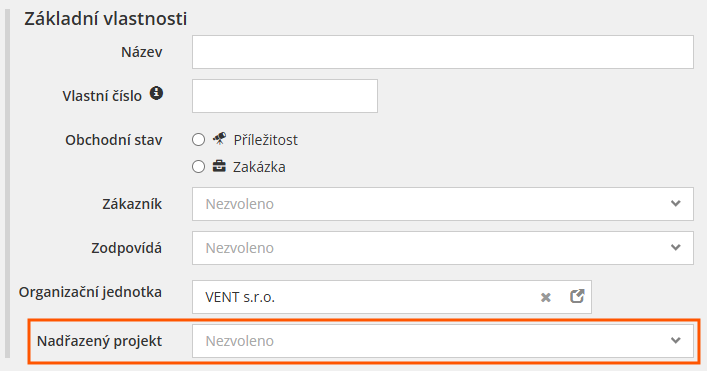
To turn a project into a subproject, select its parent project in the “Parent Project” field in the project details. Data from the subproject will then be displayed in its parent project.
Root Project and Parent Project
A root project is a project to which only subprojects are linked. It is the top-level project in the project hierarchy.
A parent project is a project to which subprojects are linked, but which is itself a subproject of another project.
Conclusion
The subproject feature in Navigo gives companies greater control, more accurate data, and a better overview. It allows you to manage complex projects in a clear and structured way, without having to split them into separate, unconnected records. This makes it easier to plan, manage, and evaluate the entire project workflow—from the initial proposal to the final billing.
A root project is a project to which only subprojects are linked. It is the top-level project in the project hierarchy.
A parent project is a project to which subprojects are linked, but which is itself a subproject of another project.